
In electronics, both flex cables and ribbon cables are widely used for compact connections. At first glance, they look similar—flat, lightweight, and space-saving. But in reality, they are quite different in structure, flexibility, and applications.
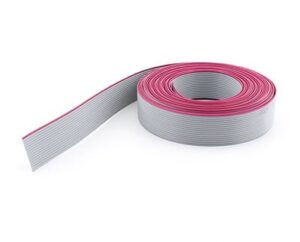
Flex Cable vs Ribbon Cable
This guide will help you understand the differences between flex cables (FFC/FPC) and ribbon cables, so you can select the right solution for your device or repair project.
📌 What is a Flex Cable?
Flex cable is a general term covering two major types:
FFC (Flexible Flat Cable):
Made of multiple flat conductors laminated in plastic.
Simple, cost-effective, used in laptops, printers, and scanners.
FPC (Flexible Printed Circuit):
Made by etching copper traces on a flexible substrate like polyimide.
Can be single-layer or multi-layer, supporting complex circuits.
Found in smartphones, cameras, LCD displays.
Key Traits of Flex Cables:
Very thin and bendable
Can fold or twist without breaking (especially FPC)
Suitable for dynamic, high-density electronic connections
📌 What is a Ribbon Cable?
A ribbon cable (also called flat ribbon cable) is a cable where multiple insulated round conductors are arranged side-by-side in a flat, ribbon-like form.
Key Traits of Ribbon Cables:
Traditionally gray with colored edge wire for polarity marking
Used in older PCs, hard drives (IDE, floppy), and industrial equipment
Typically less flexible than FPC/FFC (good for static connections)
Designed for parallel data transmission
🔍 Flex Cable vs Ribbon Cable: Side-by-Side Comparison
| Feature | Flex Cable (FFC/FPC) | Ribbon Cable |
|---|---|---|
| Structure | Flat copper conductors (FFC) or etched circuits (FPC) | Multiple insulated round wires in parallel |
| Flexibility | High (can bend, fold, twist) | Limited (not suitable for tight bending) |
| Complexity | Supports advanced, multi-layer circuits (FPC) | Simple parallel connections |
| Durability | FPC is very durable under repeated bends | May break under frequent bending |
| Applications | Smartphones, laptops, LCDs, cameras | PCs (IDE cables), printers, industrial gear |
| Size & Thickness | Ultra-thin and compact | Thicker, bulkier |
| Cost | Higher (FPC), Low-to-medium (FFC) | Low (economical, mass-produced) |
📱 Real-World Examples
Flex Cable (FFC/FPC):
Laptop keyboard to motherboard connection
Smartphone display connectors
Camera lens modules
Wearable electronics
Ribbon Cable:
Old desktop PC IDE cables
Floppy disk drive cables
Industrial control panels
Printers and CNC machines
✅ Which One Should You Choose?
Choose Flex Cable if:
You need compact, ultra-flexible connections
Your design involves folding, bending, or moving parts
Applications include smartphones, tablets, wearables
Choose Ribbon Cable if:
You need inexpensive, static parallel wiring
Your device is larger and doesn’t require tight bends
Applications include PCs, control systems, legacy hardware
Conclusion
Both flex cables and ribbon cables are flat, but their uses are very different:
Flex cables (FFC/FPC): ultra-thin, bendable, and ideal for modern compact electronics.
Ribbon cables: thicker, simpler, and still useful for static, low-cost connections.
👉 By understanding the difference between flex cable vs ribbon cable, you can make better decisions for design, repair, or replacement.
👉 Learn more in our Ultimate Guide to Flex Cables

1 comment
Zoritoler imol 10/02/2025
I’d need to test with you here. Which isn't something I normally do! I enjoy studying a submit that will make folks think. Also, thanks for permitting me to remark!