
When building or upgrading a computer, one essential component often overlooked is the Serial ATA cable — commonly known as a SATA cable. Whether you're connecting a hard drive (HDD), solid-state drive (SSD), or optical drive, this small cable plays a big role in ensuring fast and stable data transfer between your storage device and motherboard.
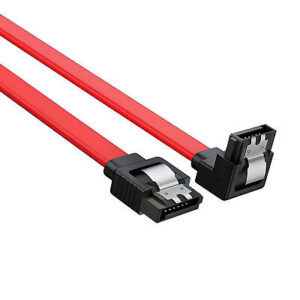
serial ata cable
In this article, we’ll break down everything you need to know about Serial ATA cables, their types, functions, and how to choose the right one.
What Is a Serial ATA Cable?
A Serial ATA (SATA) cable is a data interface cable used to connect storage devices to the motherboard. It replaced the older PATA (Parallel ATA) standard, offering faster speeds, slimmer cables, and hot-swappable capabilities.
Key advantages of SATA cables:
-
Speeds up to 6 Gbps (SATA III)
-
Simple 7-pin connector design
-
Thin, flexible, and easy to route in tight spaces
-
Widely compatible with modern HDDs and SSDs
Types of SATA Cables
-
SATA Data Cable
-
Standard 7-pin cable that connects your storage drive to the motherboard
-
Used for both 2.5' SSDs and 3.5' HDDs
-
Often red, black, or blue in color
-
Available with straight or right-angle connectors
-
-
SATA Power Cable
-
Not the same as the data cable
-
Comes from your power supply unit (PSU)
-
Has 15 pins and provides electrical power to the drive
-
-
eSATA Cable (External SATA)
-
Designed for external storage devices
-
Offers the same performance as internal SATA
-
Uses a slightly different connector for external ports
-
-
SATA to USB Cable
-
Ideal for connecting a bare SSD or HDD to a computer externally
-
Popular for data recovery, cloning, or transferring files
-
SATA Versions and Performance
| SATA Version | Speed | Typical Use |
|---|---|---|
| SATA I (1.5 Gbps) | ~150 MB/s | Legacy systems |
| SATA II (3.0 Gbps) | ~300 MB/s | Older PCs/laptops |
| SATA III (6.0 Gbps) | ~600 MB/s | Modern HDDs/SSDs |
Note: The SATA cable itself is usually compatible with all versions, but actual performance depends on the slowest component in the chain.
SATA Cable Use Cases
-
Internal HDD or SSD installation
-
Replacing or upgrading drives in desktops
-
Data transfer between systems using SATA-to-USB cables
-
Connecting DVD/CD drives to the motherboard
If you're experiencing slow file transfers, drive detection errors, or intermittent connection issues, your SATA cable could be loose or faulty.
Tips for Choosing a Good SATA Cable
-
Look for SATA III-rated cables for best performance
-
Choose right-angle connectors for tight cases
-
Use locking clips to secure connection against vibration
-
Select shielded cables to reduce interference in data-heavy builds
-
Always check the length — standard is ~18 inches (45 cm), but longer cables are available
Final Thoughts
A Serial ATA cable might be a small part of your computer setup, but it’s vital for maintaining high-speed, stable connections to your storage devices. Whether you're building a PC, upgrading to an SSD, or just replacing old hardware, using the right SATA cable ensures optimal performance and longevity.
Need Reliable SATA Cables?
At TOT Wire & Cable, we provide high-quality SATA data cables and SATA power adapters for all your computing needs — including OEM and bulk supply for system integrators.
👉 Contact us for competitive pricing and fast shipping on all SATA cable options.


