
If you’ve come across red, yellow, and white cables and aren’t sure where to plug them in—don’t worry. These cables are part of a classic analog audio-video connection known as RCA cables, and they were standard for TVs, DVD players, game consoles, and older electronics.
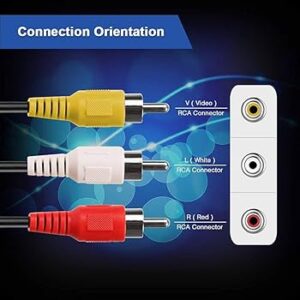
where do red yellow white cables go
Here’s everything you need to know.
🎯 What Are Red, Yellow, and White Cables?
These are RCA connectors used to transmit audio and video signals between devices:
-
Yellow: Composite video (standard-definition video signal)
-
White: Left audio channel (mono or stereo)
-
Red: Right audio channel (for stereo sound)
🧩 Where Do Red, Yellow, and White Cables Go?
1. TVs
Look for matching color-coded RCA input ports on the back or side of your TV:
-
Plug the yellow cable into the yellow 'Video In' port.
-
Plug the white cable into the white 'Audio L' port.
-
Plug the red cable into the red 'Audio R' port.
These ports are often labeled AV IN, VIDEO IN, or COMPOSITE.
2. DVD Players / VCRs / Game Consoles
-
These devices typically have AV OUT ports with matching red, white, and yellow jacks.
-
Connect the cables from AV OUT (device) to AV IN (TV) using the same color scheme.
🛠 What If My TV Has No RCA Inputs?
Newer TVs may not have red/yellow/white RCA ports. Here's what you can do:
-
Use an RCA to HDMI converter: This lets you connect older devices to a modern HDMI-only TV.
-
Use a SCART adapter (in some countries like the UK or Europe).
-
Check if your device also has component (red, green, blue) or HDMI output options.
🔄 What’s the Difference Between These and HDMI?
-
RCA (red, white, yellow): Analog signals, standard definition
-
HDMI: Digital signal, supports high-definition video and audio in one cable
So if both options are available, HDMI is the better choice for video and audio quality.
📝 Quick Setup Steps
-
Match red to red, white to white, and yellow to yellow.
-
Switch your TV’s input source to “AV” or “Video.”
-
Power on your device (DVD player, game console, etc.).
-
You should see and hear the content on your screen.
🧠 Tip: Don’t Mix Them Up
While they won’t damage anything if plugged incorrectly, plugging cables into the wrong ports will lead to:
-
No video (if yellow is in the wrong spot)
-
Unbalanced or no audio (if red/white are swapped)
Always match the color-coded labels!
Final Thoughts
Red, white, and yellow cables are still useful for connecting older devices, even if they’ve mostly been replaced by HDMI in newer electronics. Knowing where these cables go helps you get the most out of your retro gear—or make a smooth transition to digital connections.


