
When working with Ethernet cables, knowing the correct Ethernet wire color code is essential for ensuring proper network connections, minimizing signal interference, and avoiding costly installation errors. Whether you're making your own patch cables or terminating network ports, understanding the two main standards—T568A and T568B—is key.
This guide explains Ethernet cable color coding, the difference between the two wiring schemes, and when to use each.
📦 What Is an Ethernet Cable?
Ethernet cables, commonly referred to as Cat5e, Cat6, or Cat6a cables, contain four twisted pairs of wires (8 wires total). These wires transmit data signals between devices in a local area network (LAN), including routers, switches, computers, and VoIP phones.
The most common connector used is the RJ45 plug.
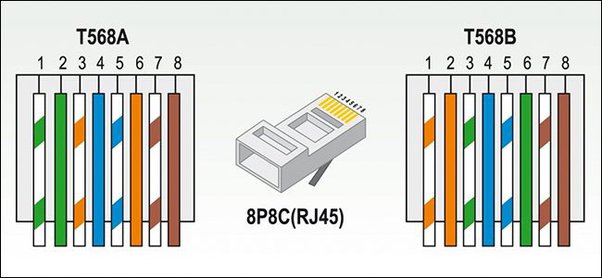
ethernet wire color code
🎨 Ethernet Wire Color Code: T568A and T568B
There are two accepted wiring standards for Ethernet cables:
-
T568A
-
T568B
Both standards use the same colored wires, but they assign the colors to different pin numbers on the RJ45 connector.
🔗 T568A Wiring Standard (ANSI/TIA-568)
| Pin | Wire Color | Pair # |
|---|---|---|
| 1 | White/Green | 3 |
| 2 | Green | 3 |
| 3 | White/Orange | 2 |
| 4 | Blue | 1 |
| 5 | White/Blue | 1 |
| 6 | Orange | 2 |
| 7 | White/Brown | 4 |
| 8 | Brown | 4 |
🔗 T568B Wiring Standard (Most Common in the U.S.)
| Pin | Wire Color | Pair # |
|---|---|---|
| 1 | White/Orange | 2 |
| 2 | Orange | 2 |
| 3 | White/Green | 3 |
| 4 | Blue | 1 |
| 5 | White/Blue | 1 |
| 6 | Green | 3 |
| 7 | White/Brown | 4 |
| 8 | Brown | 4 |
🧠 What’s the Difference Between T568A and T568B?
The only difference between T568A and T568B is the positioning of the orange and green wire pairs. The pinout for pairs 2 and 3 is swapped.
-
T568B is the most widely used in commercial installations and patch cables.
-
T568A is preferred for new residential installations and is compatible with older telecom wiring.
🔄 Straight-Through vs Crossover Ethernet Cables
| Cable Type | End A | End B | Use Case |
|---|---|---|---|
| Straight-through | T568A or T568B | T568A or T568B (same) | Connecting different devices (PC to switch) |
| Crossover | T568A | T568B | Connecting similar devices (PC to PC) |
➡ Most modern equipment supports Auto-MDI/MDIX, making crossover cables less critical.
🛠 How to Crimp Ethernet Cables
-
Strip about 1 inch of cable jacket.
-
Untwist and arrange wires by the selected color code (T568A or B).
-
Trim wires evenly and insert into the RJ45 connector.
-
Crimp firmly with a crimping tool.
-
Test the cable with a cable tester to verify connections.
✅ Summary: Ethernet Wire Color Code Chart
| Pair # | Color (T568A) | Color (T568B) |
|---|---|---|
| 1 | Blue, White/Blue | Blue, White/Blue |
| 2 | Orange, White/Orange | Green, White/Green |
| 3 | Green, White/Green | Orange, White/Orange |
| 4 | Brown, White/Brown | Brown, White/Brown |
🧾 Conclusion
Understanding the Ethernet wire color code helps ensure consistent, reliable network connections. Whether you're setting up a home office, data center, or installing PoE devices, choosing the correct wiring standard—T568A or T568B—and following proper wiring techniques is essential.
For most modern installations, T568B remains the default choice. Just remember to use the same standard on both ends of the cable unless you're intentionally making a crossover cable.


